Power cables and connectors: Difference between revisions

From HPCWIKI
Jump to navigation Jump to search
(Add categories: Server, Reference)
(Template migration to LLM-Optimized Wiki Template)
Line 1: Line 1:
{{Status
|status=Draft
|owner=Knowledge Agent
|last_update=2026-07-16
|review=Pending
}}
{{TOC}}
== Overview ==
Power cables and connectors에 대한 기술 문서입니다.
=== Summary ===
* 무엇인가? - Power cables and connectors
* 왜 필요한가? - HPC 및 서버 환경에서 필수 개념
* 언제 사용하는가? - 서버 구성, 성능 튜닝, 문제 해결 시
---
== Purpose ==
이 문서가 존재하는 이유
* Goal: Power cables and connectors에 대한 기술 정보 제공
* Scope: Power cables and connectors의 개념, 사용법, 설정
* Non-goals: 다른 주제로의 확장
---
== Key Concepts ==
{| class="wikitable"
! Concept
! Description
! Related
|-
| Power cables and connectors
| HPC/서버 환경에서 중요한 기술 개념
| [[Linux]], [[Server]]
|}
---
== Detailed Explanation ==
Whether you are a seasoned veteran or a newcomer to the the server system building it is essential to understand the various power cables and connectors required to safely power [[PCIe]] computing units such as GPU.
So we made an summary to ensure that the system runs smoothly without any crashes, and will also prevent potential disasters like electrical fires or damaged hardware.
== Different Types Of Gpu Power Connectors ==
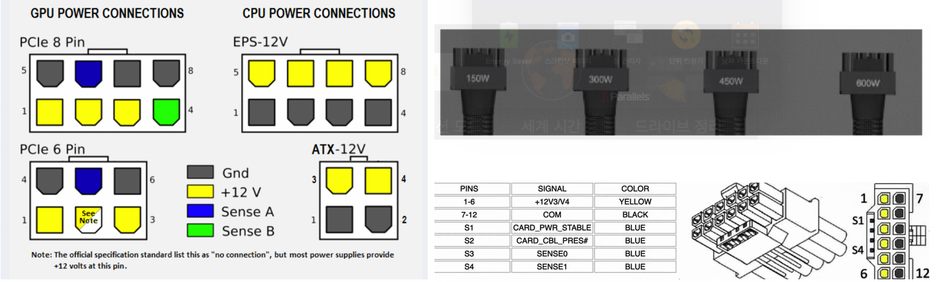
GPU consume power from PCIe and power cables,  in general, PCIe bus supports 75W of power.  
  [[File:Cable connector pinout2.png|center|frameless|936x936px]]  
  [[File:Cable connector pinout2.png|center|frameless|936x936px]]  
Line 22: Line 66:
|PCIe 6+2 or 8-Pin
|PCIe 6+2 or 8-Pin
|150W
|150W
|<300W GPU
|[[File:PCIe-8pin-cable.png|frameless]]
|
|-
|CPU '''EPS-12V (EATX12V)'''
|8pin (336W)
4pin (168W)
|<300W GPU
|[[File:EPS12 4+4.png|left|frameless|177x177px|EPS12_4+4]]
|
|-
|'''12VHPWR'''
(12-Volt High Power).


Also known as PCIe Gen5 16-pin(12+4-Pin)<ref>https://videocardz.com/newz/pcie-gen5-power-connector-is-compatible-with-geforce-rtx-30-founders-edition</ref><ref>https://www.techpowerup.com/forums/threads/intel-atx-3-0-16-pin-power-connector-for-pcie-gen5-is-smart-has-four-power-delivery-variants.292563/</ref>
---
|150/300
/450/600W
depending on the sideband
|RTX 3000/4000 series
|[[File:PCIe-12pin-cable.png|frameless]]Designed for Gen-5/ATX 3.0 PSUs
Gen-4/ATX 2.0 needs an 8-pin to 16-pin 600W 12VHPWR adapter
|Power/Ground Pin Wire Size: 16 AWG
Sideband Signals Pin Wire Size: 28 AWG
|}


=== The Difference Between a 6-pin, 8-pin, and 12-pin GPU Cable<ref>https://www.ptspeed.com/blogs/articles/what-s-the-difference-between-a-6-pin-8-pin-and-12-pin-gpu-cable</ref> ===
== Best Practices ==


* The 6-pin power connector has 4.2mm pitch and can pull up to 75 watts of power directly from an external power supply
* 최신 버전 사용 권장
* 8-pin connectors have 4.2mm pitch and can deliver up to 150 watts, twice the amount that a 6-pin connector is capable of
* 공식 문서 참고
* The 12-pin connector has a 3.0mm pitch, which means its total physical width is equal to an 8-pin connector
* 테스트 환경에서 먼저 검증


{| class="wikitable"
---
|+GPU Max Power Consumption in Watt with 6/8-pin cables
!PCI Express x16
!6-Pin Connector
!8-Pin Connector
!Total Power
|-
|75W
|
|
|75W
|-
|75W
|1 x 75W
| -
|150W
|-
|75W
| -
|1 x 150W
|225W
|-
|75W
|2 x 75W
| -
|225W
|-
|75W
|1 x 75W
|1x 150W
|300W
|-
|75W
| -
|2x 150W
|375W
|}
 
== 12VHPWR and sideband ==
The twelve power pins have a 9.2A per pin/position current rating at '''30C T-rise''' above ambient temperature conditions at 12V, energizing all twelve contacts. This means that the pins should be able to deliver up to 1324.8W! so the connector’s body must have a label or embossed '''“H++”''' characters to indicate the [[support]] of 9.2A per pin or higher.  The wire thickness is 16 AWG, while the wire size is 28 AWG for the sideband signal pins.
 
[[File:12VHPWR-pinout.png|frameless|900x900px]]
 
The 16-pin connector comprises twelve power pins arranged in two parallel rows, and four auxiliary sense pins that communicate the maximum allowable power draw<ref>https://en.wikipedia.org/wiki/12VHPWR</ref>
 
* <u>Optional</u> CARD_PWR_STABLE signal is a "Power Good" signal, except it comes from Add-in Card rather than from PSU. The Add-in Card sets this signal to Open (high impedance) when its power rails are within their operating limits. When the card pulls this signal low, it indicates that any of its power rails are outside of proper limits, which resulted in a fault.
* An <u>optional</u> CARD_CBL_PRES# signal tells PSU that an Add-in Card is detected and present. All four sideband signals can vary from 0 to 3.3V.
 
* The sideband signals SENSE0/SENSE1 definitions, which signal maximum available power from the PSU based on the ATX v3.1 & '''PCI-SIG PCIe CEM Rev 5.1 specification.<ref>https://edc.intel.com/content/www/us/en/design/ipla/software-development-platforms/client/platforms/alder-lake-desktop/atx-version-3-0-multi-rail-desktop-platform-power-supply-design-guide/2.1/pci-express-pcie-add-in-card-connectors-recommended/</ref>''' These updated SENSE0/SENSE1 combinations ensure that an Add-in Card may only draw power only when the power pins and the sideband pins are engaged and correctly asserted.
{| class="wikitable"
|+The SENSE0/1 setting of the 12VHPWR connector.
!SENSE0 (s3)
!SENSE1 (s4)
!Initial Permitted Power at System Power Up
!Maximum Sustained Power After Software Configuration
!Notes
|-
|Ground
|Ground
|375W
|600W
|
|-
|Open
|Ground
|225W
|450W
|
|-
|Ground
|Open
|150W
|300W
|
|-
| colspan="2" |Short
|100W
|150W
|NVIDIA has to change the graphics cards with the new 12V-2×6 connector to replace the open-open scenario with 0 Watt and PSU manufacturers have to short the SENSE pins for 150W max output.
|-
|Open
|Open
|0W
|0W
|
|}
 
*


== References ==


Different Types of Cable
* [https://wiki.hpcmate.com Power cables and connectors]


There are two popular wire size standards, AWG (American Wire Gauge) and Metric Wire Gauges<ref>https://www.powerstream.com/Wire_Size.htm</ref>
---


It is important to know cable spec of your power connection to GPU or other devices to avoid potential disasters like electrical fires or damaged hardware.
== Related Pages ==


18 AWG cable is widly used for GPU power cable at the time of writing this page.
* [[Linux]]
* [[Server]]
* [[Hardware]]
* [[Network]]


== References ==
---
<references />
[[Category:Server]]


[[Category:Hardware]]
[[Category:Reference]]
[[Category:Reference]]

Revision as of 15:17, 16 July 2026

Template:Status

Template:TOC

Overview

Power cables and connectors에 대한 기술 문서입니다.

Summary

  • 무엇인가? - Power cables and connectors
  • 왜 필요한가? - HPC 및 서버 환경에서 필수 개념
  • 언제 사용하는가? - 서버 구성, 성능 튜닝, 문제 해결 시

---

Purpose

이 문서가 존재하는 이유

  • Goal: Power cables and connectors에 대한 기술 정보 제공
  • Scope: Power cables and connectors의 개념, 사용법, 설정
  • Non-goals: 다른 주제로의 확장

---

Key Concepts

Concept Description Related
Power cables and connectors HPC/서버 환경에서 중요한 기술 개념 Linux, Server

---

Detailed Explanation

Whether you are a seasoned veteran or a newcomer to the the server system building it is essential to understand the various power cables and connectors required to safely power PCIe computing units such as GPU. So we made an summary to ensure that the system runs smoothly without any crashes, and will also prevent potential disasters like electrical fires or damaged hardware. GPU consume power from PCIe and power cables, in general, PCIe bus supports 75W of power.

Cable connector pinout2.png
Connector type Max. Power[1] Idel for Notices (Picture from cgdirector)[2] Notes
PCIe 6-Pin 75W Old GPU Pcie-6pin-cable.png
PCIe 6+2 or 8-Pin 150W

---

Best Practices

  • 최신 버전 사용 권장
  • 공식 문서 참고
  • 테스트 환경에서 먼저 검증

---

References

---

Related Pages

---