Power cables and connectors: Difference between revisions
Jump to navigation
Jump to search
(Template migration to LLM-Optimized Wiki Template) |
(Added Knowledge Graph section) |
||
| Line 93: | Line 93: | ||
[[Category:Hardware]] | [[Category:Hardware]] | ||
== Knowledge Graph == | |||
Related | |||
→ [[Linux]] | |||
→ [[Server]] | |||
→ [[Hardware]] | |||
→ [[Network]] | |||
[[Category:Reference]] | [[Category:Reference]] | ||
Revision as of 15:38, 16 July 2026
Overview
Power cables and connectors에 대한 기술 문서입니다.
Summary
- 무엇인가? - Power cables and connectors
- 왜 필요한가? - HPC 및 서버 환경에서 필수 개념
- 언제 사용하는가? - 서버 구성, 성능 튜닝, 문제 해결 시
---
Purpose
이 문서가 존재하는 이유
- Goal: Power cables and connectors에 대한 기술 정보 제공
- Scope: Power cables and connectors의 개념, 사용법, 설정
- Non-goals: 다른 주제로의 확장
---
Key Concepts
| Concept | Description | Related |
|---|---|---|
| Power cables and connectors | HPC/서버 환경에서 중요한 기술 개념 | Linux, Server |
---
Detailed Explanation
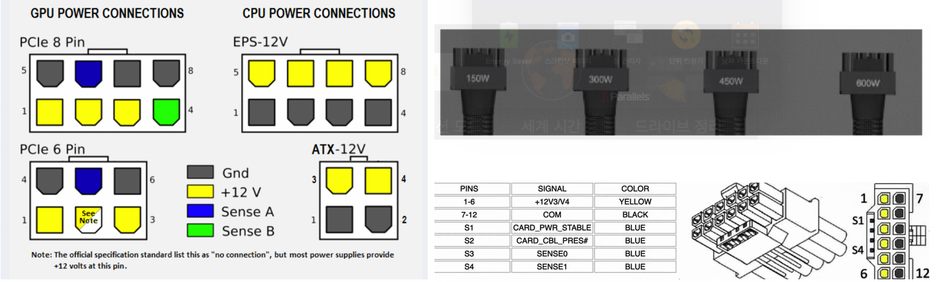
Whether you are a seasoned veteran or a newcomer to the the server system building it is essential to understand the various power cables and connectors required to safely power PCIe computing units such as GPU. So we made an summary to ensure that the system runs smoothly without any crashes, and will also prevent potential disasters like electrical fires or damaged hardware. GPU consume power from PCIe and power cables, in general, PCIe bus supports 75W of power.

| Connector type | Max. Power[1] | Idel for | Notices (Picture from cgdirector)[2] | Notes |
|---|---|---|---|---|
| PCIe 6-Pin | 75W | Old GPU | 
|
|
| PCIe 6+2 or 8-Pin | 150W
--- Best Practices
--- References--- Related Pages--- Knowledge GraphRelated |