USB connector: Difference between revisions
Jump to navigation
Jump to search
(Added Knowledge Graph section) |
(Fix: remove --- horizontal lines (7 removed)) |
||
| Line 18: | Line 18: | ||
* 언제 사용하는가? - 서버 구성, 성능 튜닝, 문제 해결 시 | * 언제 사용하는가? - 서버 구성, 성능 튜닝, 문제 해결 시 | ||
== Purpose == | == Purpose == | ||
| Line 28: | Line 27: | ||
* Non-goals: 다른 주제로의 확장 | * Non-goals: 다른 주제로의 확장 | ||
== Key Concepts == | == Key Concepts == | ||
| Line 42: | Line 40: | ||
|} | |} | ||
== Detailed Explanation == | == Detailed Explanation == | ||
| Line 57: | Line 54: | ||
<references /> | <references /> | ||
== Best Practices == | == Best Practices == | ||
| Line 65: | Line 61: | ||
* 테스트 환경에서 먼저 검증 | * 테스트 환경에서 먼저 검증 | ||
== References == | == References == | ||
| Line 71: | Line 66: | ||
* [https://wiki.hpcmate.com USB connector] | * [https://wiki.hpcmate.com USB connector] | ||
== Related Pages == | == Related Pages == | ||
| Line 80: | Line 74: | ||
* [[Network]] | * [[Network]] | ||
[[Category:Server]] | [[Category:Server]] | ||
Latest revision as of 11:31, 17 July 2026
Overview
USB connector에 대한 기술 문서입니다.
Summary
- 무엇인가? - USB connector
- 왜 필요한가? - HPC 및 서버 환경에서 필수 개념
- 언제 사용하는가? - 서버 구성, 성능 튜닝, 문제 해결 시
Purpose
이 문서가 존재하는 이유
- Goal: USB connector에 대한 기술 정보 제공
- Scope: USB connector의 개념, 사용법, 설정
- Non-goals: 다른 주제로의 확장
Key Concepts
| Concept | Description | Related |
|---|---|---|
| USB connector | HPC/서버 환경에서 중요한 기술 개념 | Linux, Server |
Detailed Explanation
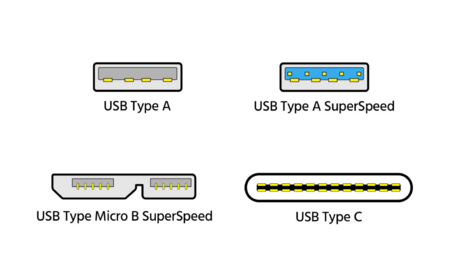
The naming convention of USB has become really messy. Here’s how it breaks down.[1]
- USB 3.2 Gen 1, is USB 3.0. It has a maximum throughput of 5Gbps. This is also known as SuperSpeed USB.
- USB 3.2 Gen 2, is USB 3.1. It has a maximum throughput of 10Gbps. This is also known as SuperSpeed USB 10Gbps.
- USB 3.2 Gen 2×2, is USB 3.2. It has a maximum throughput of 20Gbps. This is also known as SuperSpeed USB 20Gbps.

USB types, like A, B, and C, tell you the shape of the port and connector, but not the data transfer speed.
USB-C is the latest type of connector, and is usually associated with USB 3.2 Gen 2 but not necessarily, it can also be USB 3.2 Gen 1 or it may not be USB at all. the USB-C type connector is also used for Thunderbolt 3. Thunderbolt 3 offers data transfer rates up to 40GBps, which is four times that of USB 3.2 Gen 2.
- Thunderbolt 2 has a maximum throughput of 20Gb/sec
- Thunderbolt 3 has a maximum throughput of 40Gb/sec
Best Practices
- 최신 버전 사용 권장
- 공식 문서 참고
- 테스트 환경에서 먼저 검증
References
Related Pages
Knowledge Graph
Related