HMDLS-CUBE: Difference between revisions
Jump to navigation
Jump to search
(Fix: remove --- horizontal lines (7 removed)) |
({{Status}}/{{TOC}} 템플릿 제거) |
||
| Line 1: | Line 1: | ||
== Overview == | == Overview == | ||
| Line 17: | Line 8: | ||
* 왜 필요한가? - HPC 및 서버 환경에서 필수 개념 | * 왜 필요한가? - HPC 및 서버 환경에서 필수 개념 | ||
* 언제 사용하는가? - 서버 구성, 성능 튜닝, 문제 해결 시 | * 언제 사용하는가? - 서버 구성, 성능 튜닝, 문제 해결 시 | ||
== Purpose == | == Purpose == | ||
| Line 26: | Line 16: | ||
* Scope: HMDLS-CUBE의 개념, 사용법, 설정 | * Scope: HMDLS-CUBE의 개념, 사용법, 설정 | ||
* Non-goals: 다른 주제로의 확장 | * Non-goals: 다른 주제로의 확장 | ||
== Key Concepts == | == Key Concepts == | ||
| Line 39: | Line 28: | ||
| [[Linux]], [[Server]] | | [[Linux]], [[Server]] | ||
|} | |} | ||
== Detailed Explanation == | == Detailed Explanation == | ||
| Line 63: | Line 51: | ||
{| class="wikitable" | {| class="wikitable" | ||
|- | |- | ||
== Best Practices == | == Best Practices == | ||
| Line 70: | Line 57: | ||
* 공식 문서 참고 | * 공식 문서 참고 | ||
* 테스트 환경에서 먼저 검증 | * 테스트 환경에서 먼저 검증 | ||
== References == | == References == | ||
* [https://wiki.hpcmate.com HMDLS-CUBE] | * [https://wiki.hpcmate.com HMDLS-CUBE] | ||
== Related Pages == | == Related Pages == | ||
| Line 83: | Line 68: | ||
* [[Hardware]] | * [[Hardware]] | ||
* [[Network]] | * [[Network]] | ||
[[Category:Server]] | [[Category:Server]] | ||
Revision as of 13:23, 2 October 2026
Overview
HMDLS-CUBE에 대한 기술 문서입니다.
Summary
- 무엇인가? - HMDLS-CUBE
- 왜 필요한가? - HPC 및 서버 환경에서 필수 개념
- 언제 사용하는가? - 서버 구성, 성능 튜닝, 문제 해결 시
Purpose
이 문서가 존재하는 이유
- Goal: HMDLS-CUBE에 대한 기술 정보 제공
- Scope: HMDLS-CUBE의 개념, 사용법, 설정
- Non-goals: 다른 주제로의 확장
Key Concepts
| Concept | Description | Related |
|---|---|---|
| HMDLS-CUBE | HPC/서버 환경에서 중요한 기술 개념 | Linux, Server |
Detailed Explanation

- Artificial intelligence
- Heavy scientific computation
- High-performance computing
- Research lab/national lab
- Astrophysics, business intelligence
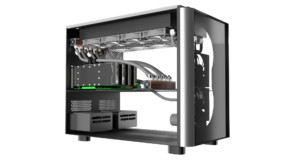
- DLS-CUBE @ homepage
- Physics dynamic optimized liquid cooling design
- Unlimited CPU and GPU TDP
- Fully integrated hardware & software
- Active thermal monitoring and cooling control
- In-house design/CNC machining
- CoolGX liquid cooling technology - High performance GPGPU computing on the office table
- Adjustable Max. noise level through CoolGX configuration
- Single Socket AMD EPYC™ 7002/7003/9004 (with AMD 3D V-Cache™ Technology*) series processors
- 8 DIMM slots , supports DDR4 RDIMM, LRDIMM, RDIMM/LRDIMM-3DS, NVDIMM-N
- 2 10GbE, Dedicated IPMI RJ45
- 1x2.5", 3 x 3.5" internal drivebay, 2 x M.2 Internal Drive
Best Practices
- 최신 버전 사용 권장
- 공식 문서 참고
- 테스트 환경에서 먼저 검증
References
Related Pages
Knowledge Graph
Related
→ Server → Hardware → AMD EPYC → NVIDIA GPU → Liquid Cooling